Inside Node.js Streams: How Data Actually Flows
Understand readable, writable, buffering, backpressure, and how data actually flows through Node.js.
A deeper look at what happens when JavaScript meets huge binary data.
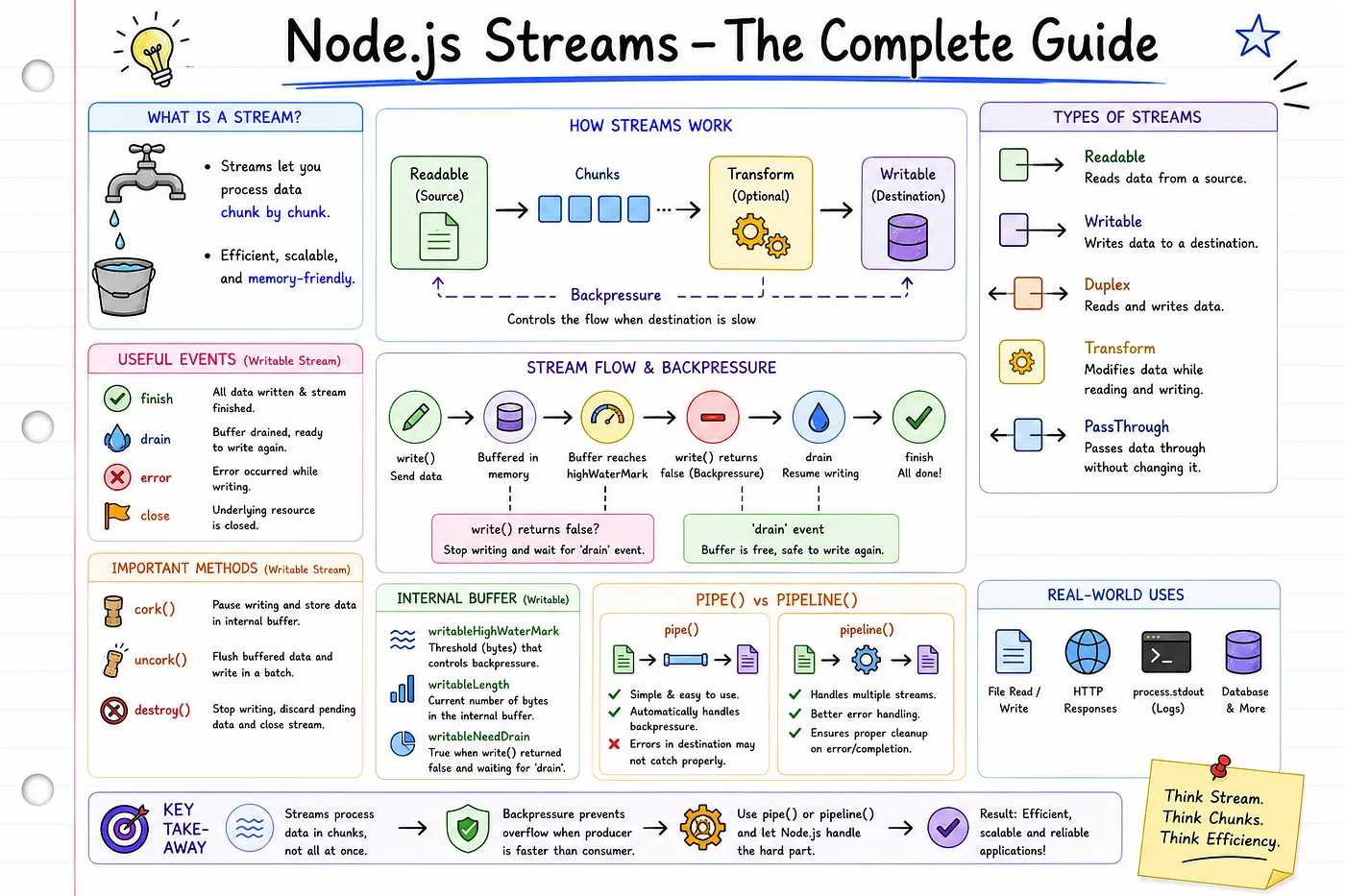
A Stream is an efficient way to transfer data from source to destination, bit by bit and without causing an out-of-memory error.
In the previous blog, we discussed and learned about Buffers. If you have not read that checkout Buffers here.
Stream transfers data in small chunks(bit by bit) and does not load the whole binary data at once into memory.
These chunks are made of small buffers.
Why are streams important?
Because they are used in,
- Video
- File
- Streaming
- transfer
- network
- TCP
The Problem Streams Solve
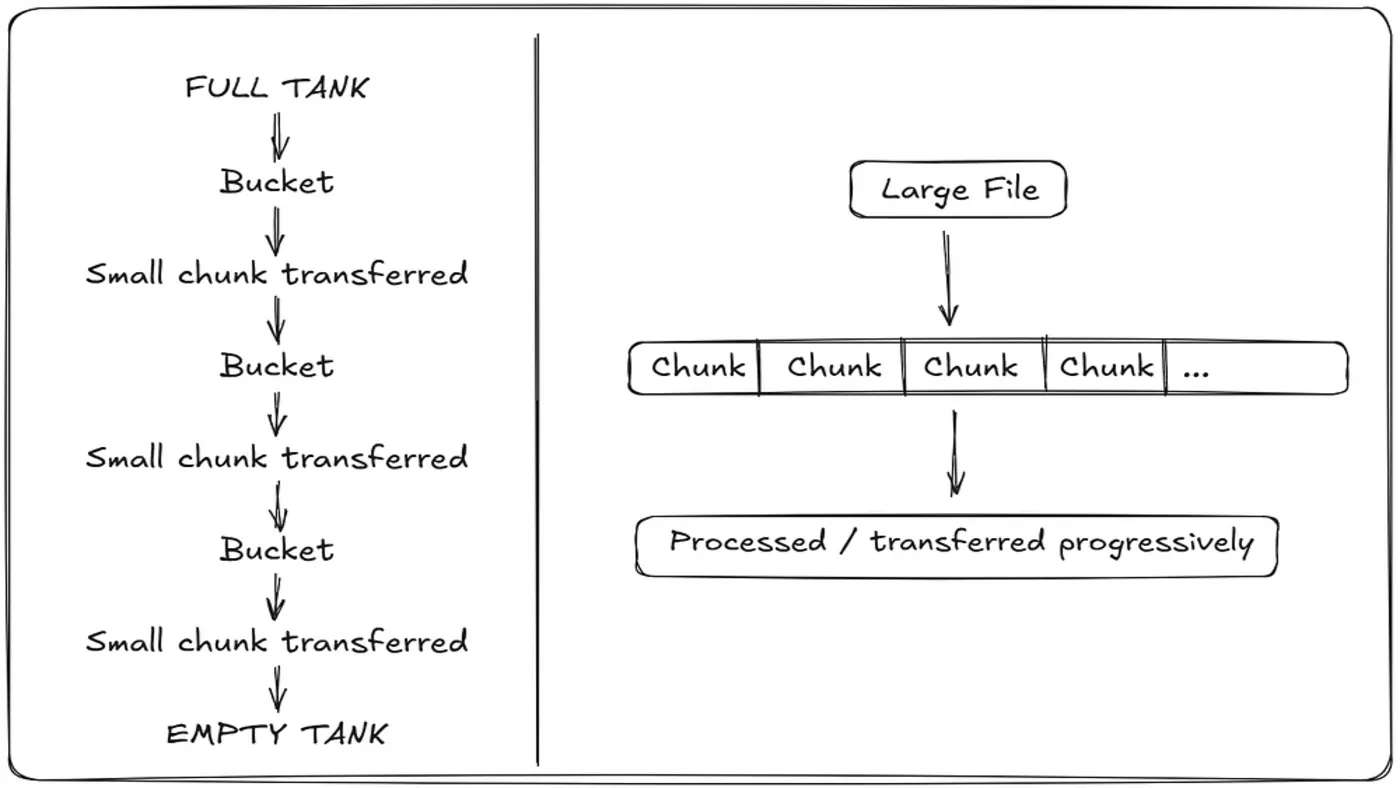
Let’s consider one scenario. If we have one Empty water tank and one full tank. Then we have to transfer all the water into the empty tank.
In this case, transferring the whole tank at once is not possible or is a very inefficient idea.
Instead of that, we can use small buckets to transfer water in some chunks. This will be an efficient and logical idea.
Just like that, when we are transferring a movie, which is 4 GB in size. in that, we don’t need to keep the entire 4 GB in memory just to process or transfer it.
A stream allows data to be handled progressively in chunks instead of requiring the entire data set to be available at once.
So, streams divide huge files into small Buffers, and those Buffers are getted transfered.
This process happens with very low memory, disk, and CPU usage, so very efficient for servers.
Buffers represent the chunks of binary data and Streams provide the mechanism for moving and processing those chunks progressively.
Readable Streams
Readable streams are used to read data chunk by chunk. For eg., when reading a large file, using a readable stream allows us to read small chunks of data into memory instead of loading the entire file.
import fs from 'fs'

const readStream = fs.createReadStream("video.mp4")
Here, this is a callback version of streams. we have also promises version of streams, which we’ll see later.
import fs from 'fs'

const readStream = fs.createReadStream("video.mp4")
readStream.on('data', (chunkBuffer) => {

     fs.appendFileSync('Hello.mp4', chunkBuffer)

  })
In this code, video.mp4 is being copied to Hello.mp4 in chunks. When we combine all chunks, we will get the same file at the destination path. To do that, we have used fs.appendFileSync(), which will append all buffers in sequential format.
.on() method provides some functionality for this work.
On a read stream, we want to listen to ‘data’ events. So, basically, whenever a data event is raised, a small chunk of data is passed to the callback function.
readStream can be used after creating it with fs.createReadStream(). When we give a file path and call it, it returns an object with some methods and properties.
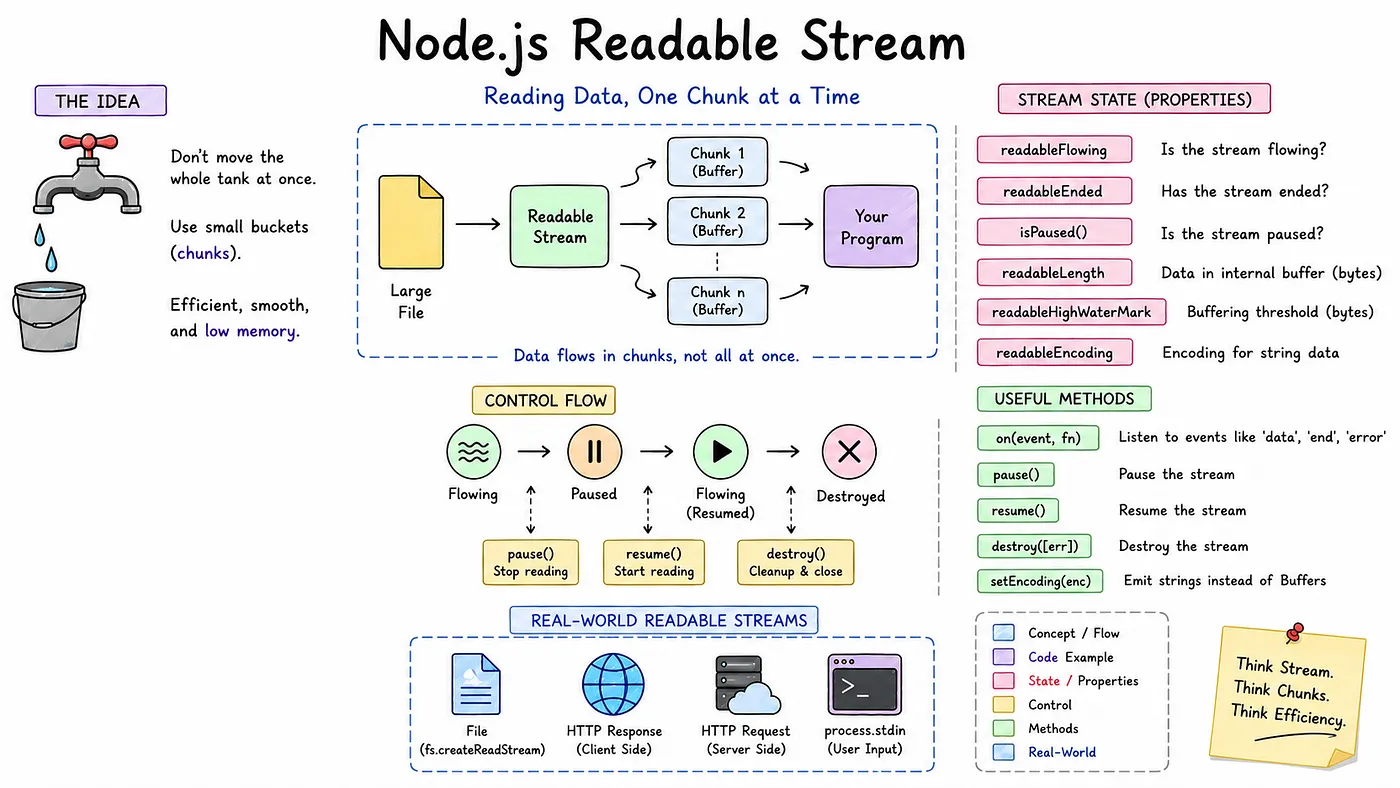
Methods of readStream
readStream.on() method
.on() is an EventEmitter method used to register an event listener. Whenever the data event occurs, run this callback.
const fs = require('fs');
const inputFilePath = 'example.txt';
// Create a readable stream
const readStream = fs.createReadStream(inputFilePath);
// Listen for 'data' events to process chunks
readStream.on('data', (chunk) => {
  console.log('Received chunk:', chunk);
});
// Listen for 'end' to detect when reading is complete
readStream.on('end', () => {
  console.log('Finished reading the file.');
});
// Listen for 'error' to handle failures
readStream.on('error', (err) => {
  console.error('An error occurred:', err.message);
});
// Listen for 'close' to perform cleanup
readStream.on('close', () => {
  console.log('Stream has been closed.');
});
Key events in a readable stream include:
data: Emitted when a chunk of data is available for readingend: Emitted when no more data is available to readerror: Emitted if an error occurs (e.g., file not found or permission issues)close: Emitted when the stream and any underlying resources are closed
readStream.pause() It stops the stream from flowing. When this method is called, data reading will be stopped.
readStream.resume() start/resume flowing. After pausing readStream, when we want to continue reading, we have to call the resume method.
readStream.destroy() The destroy method works as its name suggests; when this is called, the stream will be destroyed and release resources.
readStream.setEncoding() With this, readStream will convert into a string with the specified encoding like eg., 'utf-8'
Now,
import fs from 'fs'

const readStream = fs.createReadStream("example.txt",
{highWaterMark:10*1024*1024,
 encoding: 'utf8'
})
readStream.on('data', (chunkBuffer) => {

     fs.appendFileSync('Hello.mp4', chunkBuffer)

  })
In fs.createReadStream(), we can also pass the highWaterMark value and encoding.
A highWaterMark is defined as the internal buffer bytes. Its common default value is 16KB (16384 bytes).
However, we can change it by passing a new bytes value into the optional flag as an object, as shown in the example.
Also, the encoding can be assigned like 'utf-8'. Now chunkBuffer will give string instead of a Buffer.
Properties of readStream
readStream.readableFlowing — Whether the stream is currently flowing.
readStream.readableEnded — Whether the stream has ended.
readStream.isPaused() — Whether the stream is currently paused.
readStream.readableLength — Amount of data currently waiting in the internal buffer.
readStream.readableHighWaterMark — Buffering threshold used by the stream.
readStream.readableEncoding — Encoding used for emitted string data.
Real-world Examples
- Reading from a file
- HTTP responses on the client
- HTTP requests on the server
- process.stdin
Writable Streams
Writable Streams are used to write data chunk by chunk to a file instead of writing it all at once.
const fs = require('fs');
// Create a writable stream
const writableStream = fs.createWriteStream('output.txt');
// Write chunks to the writable stream
writableStream.write('Hello, World!\n');
writableStream.write('Nishant Dhanani!!\n');
// End the stream (important to avoid hanging the process)
writableStream.end('Done writing.\n');
// Listen for the finish event
writableStream.on('finish', () => {
  console.log('Data has been written to output.txt');
});
// Handle error event
writableStream.on('error', (err) => {
  console.error('Error writing to the file:', err);
});
Here, createWriteStream() will create a writable stream, like readable streams are made. In the function argument, we have to input the output file path.
In a writable stream, we can directly pass a string or Buffer.
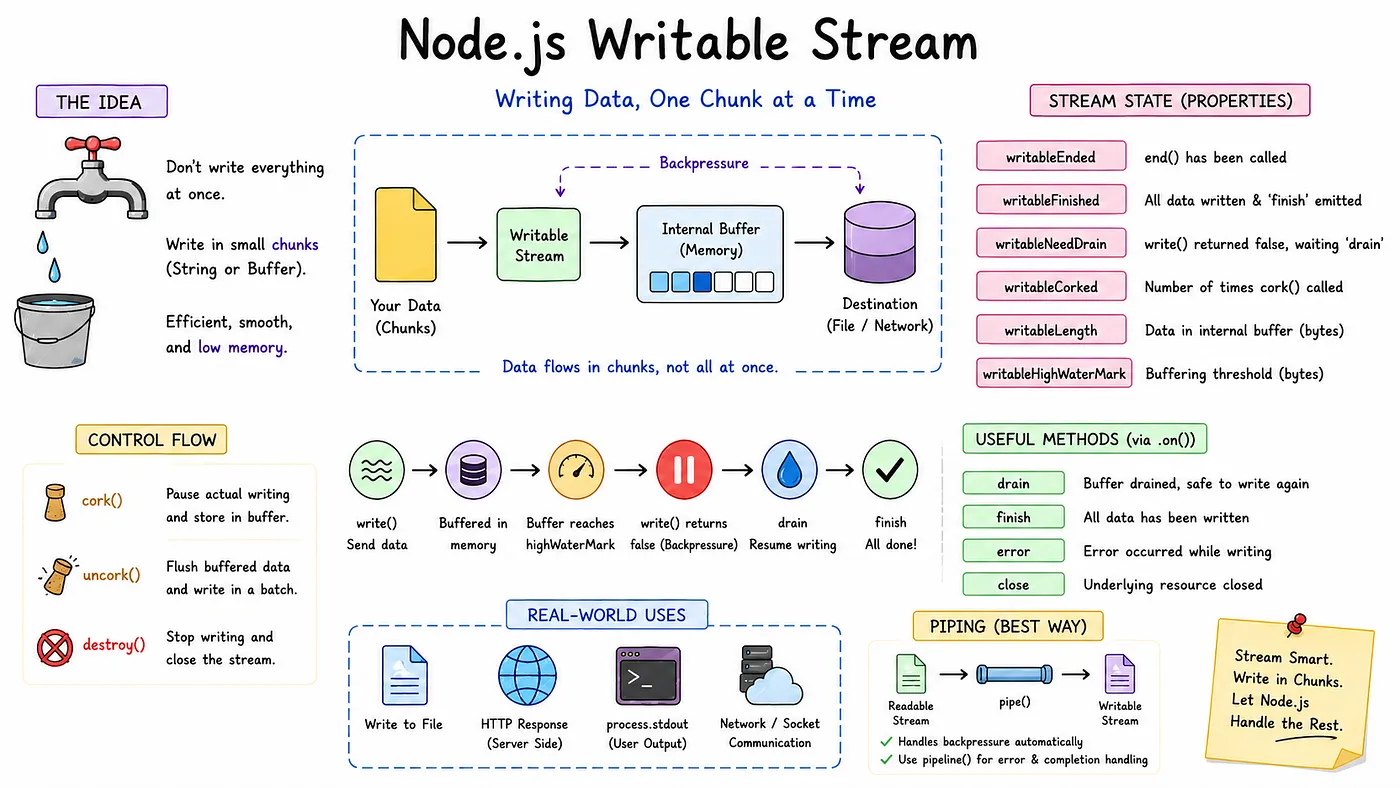
Writable Stream Methods
writableStream.write()
The write method writes data on Stream like File appends data to the file using streams.
writableStream.on()
on() comes from Node.js’s EventEmitter mechanism.
Drain: This argument of the on method emits when the internal buffer becomes empty while writing data.
End: end() signals that no more data will be written. Once the writable stream has finished processing all data, it emits finish.
Finish: finish will be called when writing to the file is completed.
Error: this will emit an error while writing the stream.
Close: close means the stream/resource has been closed.
Controlling the Stream
- cork(): When we have to store some data in a buffer instead of writing immediately. This method will stop writing data into the file and store it in the buffer.
- uncork(): It is used to release stored Buffer data by cork and write it to the stream in a bunch.
import fs from "fs";
const writeStream = fs.createWriteStream("output.txt");
writeStream.cork();
writeStream.write("Hello ");
writeStream.write("World ");
writeStream.write("Node.js!");
writeStream.uncork();
Here, when the uncork method is called, all data between cork and uncork will be written, and the internal Buffer will be flushed.
- destroy(): The destroy method will break writing data into the file and exit.
Internal Buffer
- writableHighWaterMark: In fs.createWriteStream(), we can also pass the highWaterMark value and encoding, like readStream.
const fs = require('fs');
// Create a write stream with a custom 10 MB highWaterMark
const writer = fs.createWriteStream('big_file.txt',
 { highWaterMark: 10 * 1024 * 1024,});
console.log(writer.writableLength);- writableLength: writable.writableLength property returns the total number of bytes (or objects) currently queued in the stream’s internal buffer waiting to be written to the underlying resource
Backpressure
This is the most important thing we have to consider while dealing with a writable stream.
Remember our bucket cenerio, In that bucket, water transferring is so fast, but the receiving tank is slow; this will cause bucket overflow.
Similarly, File writing to the disk is slower than writing to memory, so we have to stop loading the buffer into memory at some point; that’s called backpressure.
We have piping to implement that.
Piping
This is also like connecting two water tanks with a pipe. So we don’t have to manage buckets. We will use the major application piping instead of manually managing backpressure and buffers. This will automatically utilize all the major things.
Readable → pipe() → Writable
pipe()
This takes data coming out of a Readable Stream and automatically sends it into a Writable Stream.
In production, we mainly use pipe and pipeline functions and don’t control everything ourselves, like file appendSync and backpressure.
import { createReadStream, createWriteStream } from "fs";
import { pipeline } from "stream";
const readStream = createReadStream("A:\new.mp4");
const writeStream = createWriteStream('Nishant.mp4');
// This will automatically handles backpressure and optimizes disk usage
// Major Production used code
readStream.pipe(writeStream);
pipeline(readStream,writeStream,(err)=>{
    console.log(err);
})
pipeline()
When transferring data with pipe, what if an error occurs? This will be handled with the pipeline function from the stream class.
Also, with pipeline, we can give multiple readable streams to write, so it can handle multiple streams.
- Multiple streams.
- Error/completion handling.
Real-World Best Practices of Streams
All the above examples and scenarios are for deep understanding purposes.
Now, these are some real-world practices that we follow to make applications, and this is pretty simple to use.
Scene 1
import fs from "fs";
const readStream = fs.createReadStream("large-file.txt");
const writeStream = fs.createWriteStream("copy.txt");
readStream.pipe(writeStream);
Scene 2
import fs from "fs";
import { pipeline } from "stream";
const readStream = fs.createReadStream("input.txt");
const writeStream = fs.createWriteStream("output.txt");
pipeline(
    readStream,
    writeStream,
    (err) => {
        if (err) {
            console.error("Pipeline failed:", err);
        } else {
            console.log("Pipeline completed");
        }
    }
);
Scene 3
const readStream = fs.createReadStream("file.txt");
// Setting Encoding
readStream.setEncoding("utf8");
readStream.on("data", (chunk) => {
// here chunk will be a normal String
    console.log(chunk);
});
To see more about how streams are implemented and used daily in the real world checkout here
Real-World Examples
- Writing files
- HTTP responses
- process.stdout
- Network sockets
Summary
Streams are about how huge data is moved and processed progressively instead of doing that all at once.
So, we started with the problem of handling large amounts of data and saw how Streams work with smaller chunks. Those chunks are commonly represented by Buffers when working with binary data in Node.js.
We also saw that Streams are more than just reading and writing files. Internal buffering determines how much data is temporarily held,
while HighWaterMark, write, drain, and backpressure help control the flow when the producer and consumer operate at different speeds.
That’s about streams; I tried to provide something deep and valuable.
Thanks for reading this article!
a Nishant Dhanani Production