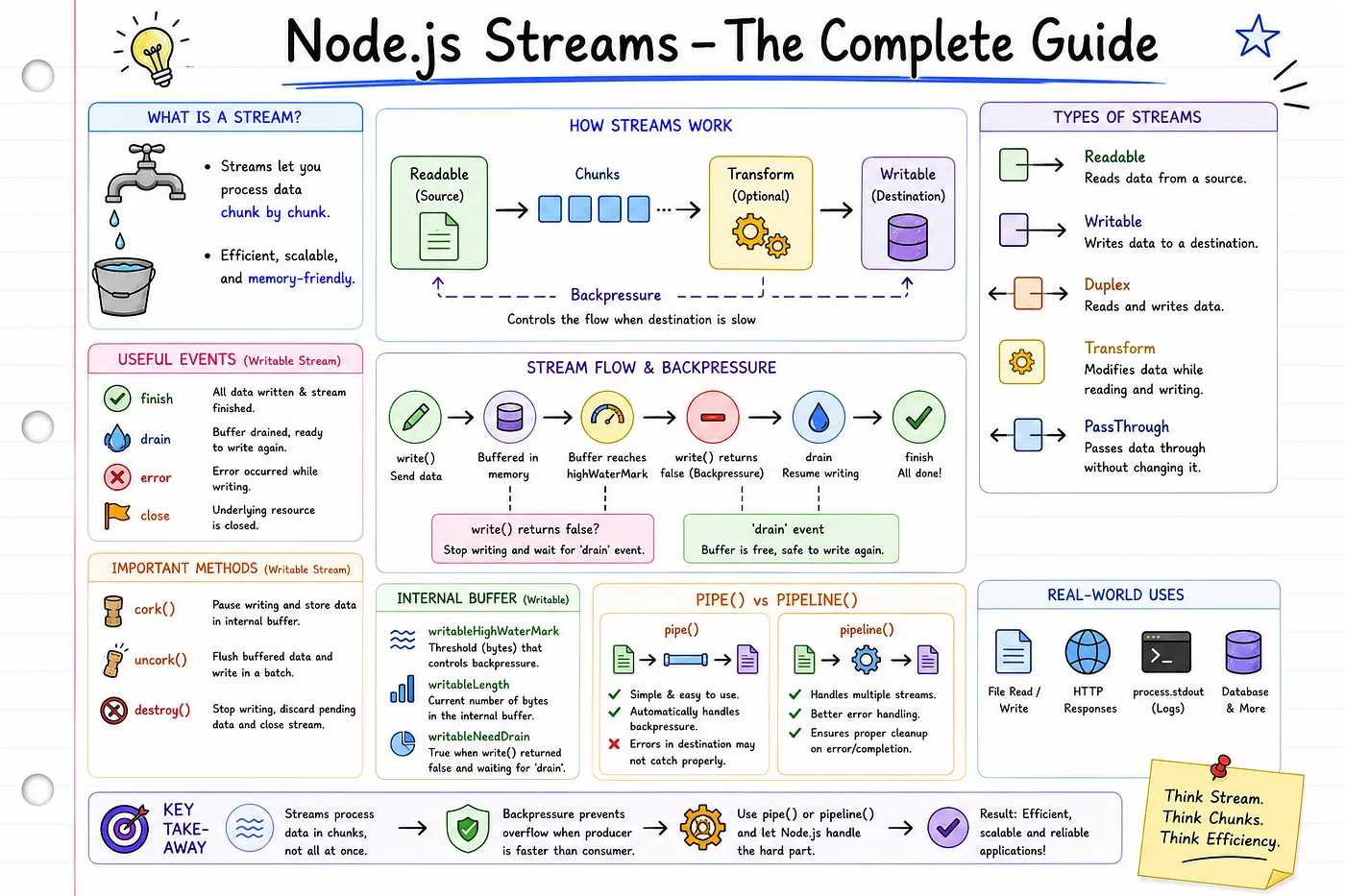
The Buffer Rabbit Hole: What Every Node.js Developer Should Know
From binary data and ArrayBuffer to Typed Arrays, Node.js Buffer, and the Buffer Pool.
A deeper look at what happens when JavaScript meets raw memory and binary data.
Binary is the base of the computer world, so interact with that Buffers are used. Buffers have two to three levels of engineering, so we will go from binary or RAM (memory ) of your computer to the Node. js-level production-used concept.

Why Buffer is important?
Because it is used in,
- Video streaming
- Images
- Videos
- Network sockets
- HTTP
- Databases
- USB devices
- Bluetooth, etc.
What exactly is a Buffer?
A Buffer is a way to store and manipulate binary data in Node.js. Binary data refers to data that consists of binary values(0 and 1), as opposed to text data, which consists of characters and symbols.
Examples of binary data include images, audio and video files, and raw data from a network.
Buffers become much more interesting when you stop thinking of them as a Node.js topic and start thinking of them as the language computers actually speak.
The ArrayBuffer
Once you understand the low-level ArrayBuffer, Node.js Buffer becomes much easier to understand—just like React feels easier once you've learned JavaScript.
Before learning Node.js Buffers, it’s helpful to understand ArrayBuffer, because it represents the underlying block of raw memory that JavaScript uses for binary data
Think of an ArrayBuffer as an empty room. The room provides space, but it doesn't know what should be placed inside it. That’s a type someone else has to read from or write to that space of ArrayBuffer.
When you create an ArrayBuffer, JavaScript reserves the requested number of bytes in memory.
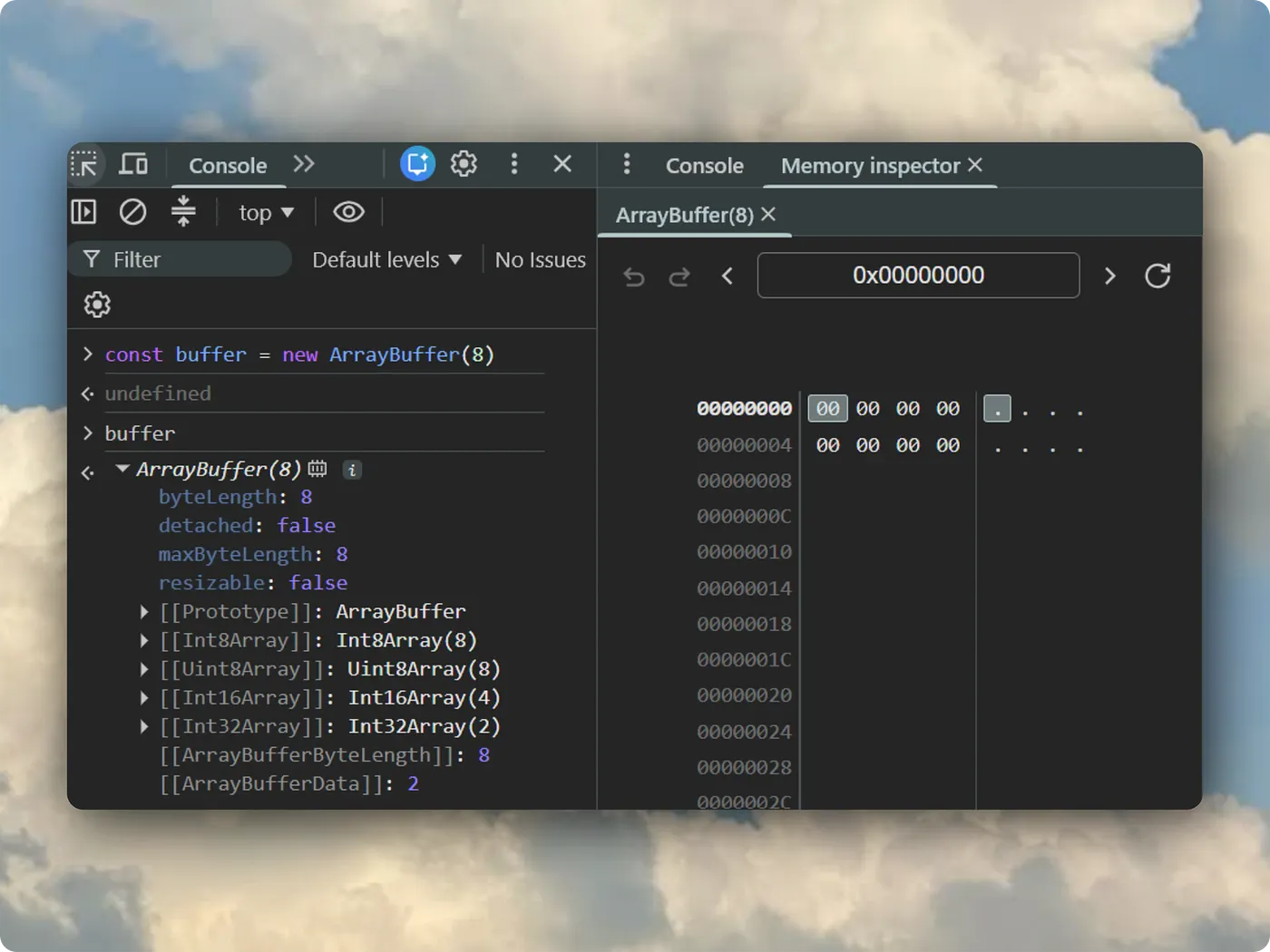
const buffer = new ArrayBuffer(8); Here, JavaScript allocates an ArrayBuffer of 8 bytes, meaning it reserves 8 consecutive bytes of memory (64 bits).
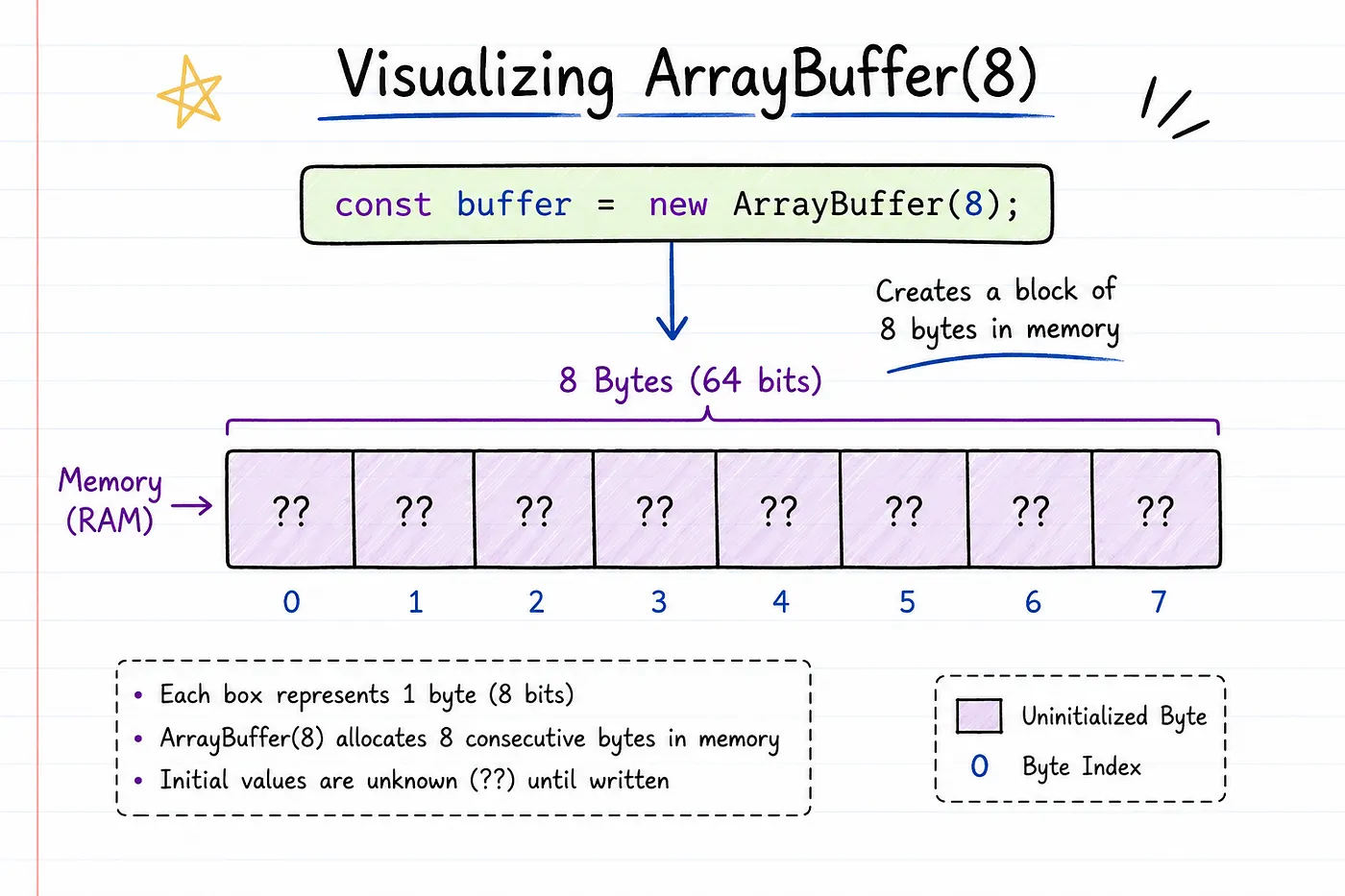
At this point, JavaScript has only reserved memory. No meaningful data has been written yet.
Tip: We can see assigned binary data through the browser’s Memory inspector via devtools. Also, an image of devtool’s Memory inspector is attached at the end of the article.
Dataview
Now, it is time to store and read data from ArrayBuffer at the binary level.
If an ArrayBuffer is an empty room, then Dataview is the person who knows how to place items into specific locations and retrieve them later.
const buffer = new ArrayBuffer(8);
const view = new DataView(buffer);
view.setInt8(1, 14);
console.log(view.getInt8(1));
Dataview is a low-level interface that lets you read and write different numeric data types directly inside an ArrayBuffer.
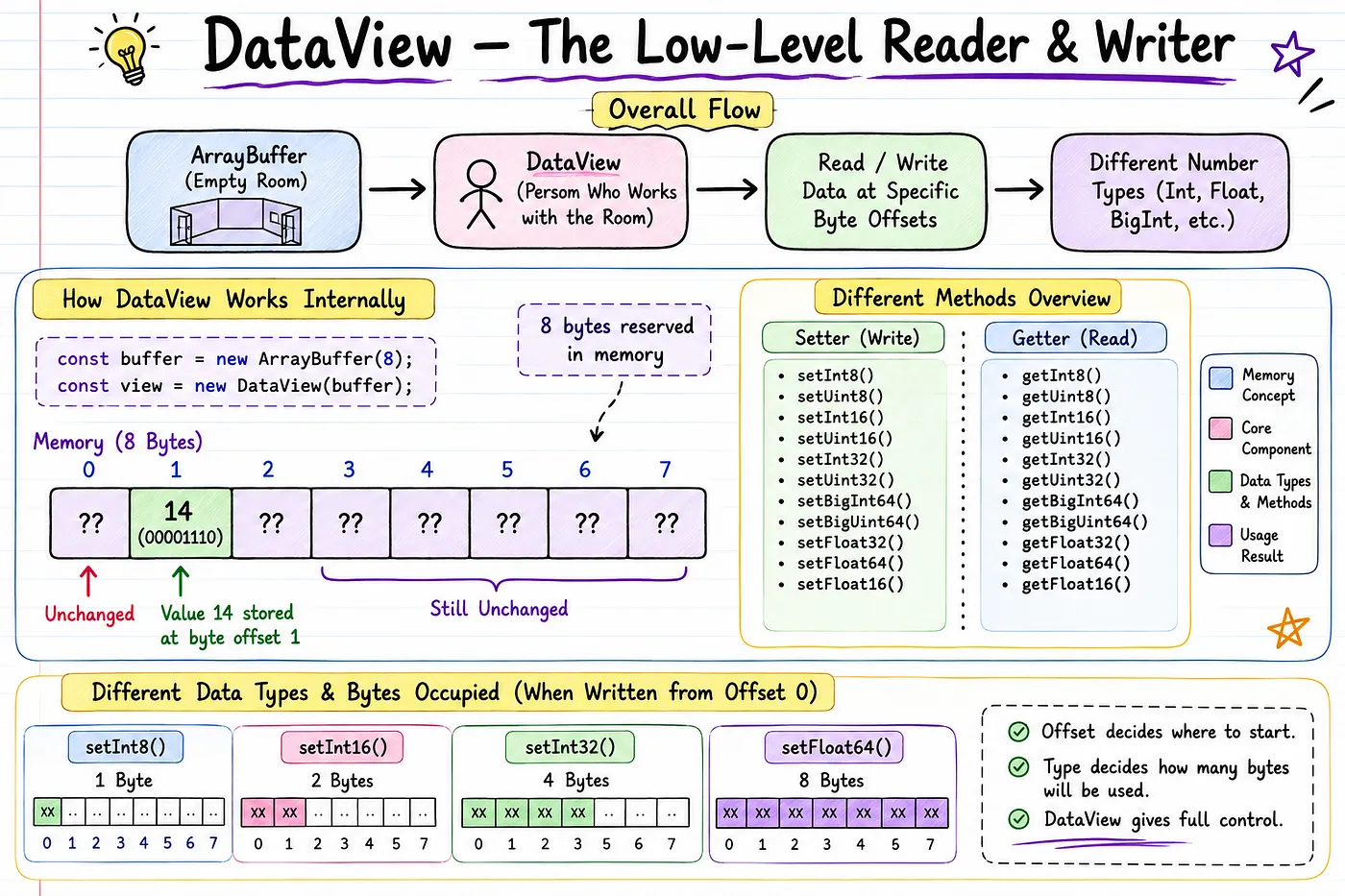
We have some getter and setter methods to store and retrieve data.
setInt8(byteOffset, value):
This method is for setting a value to the ArrayBuffer.
byteOffset: It specifies the starting byte where the value should be written or read.
setInt8() stores one signed 8-bit integer (1 byte) starting at the given byte offset.
Here, we stored the value 14 at 1 byteOffset, so in 8 bytes of ArrayBuffer, it will allocate the number “14” at index 1 rather than 0. It means index 0 will be left as it is.
This method will store signed binary data, and to store unsigned binary data, we have to use setUint8().
Also, other methods are available, which are shown in the image. But it all has only a storage allocation difference and a signed or unsigned.
getInt8(byteOffset):
This method is for retrieving a value from the ArrayBuffer.
getInt8() can get an 8-bit signed integer at one place.
This method will get signed binary data, and to get unsigned binary data we have to use getUint8().
Also, other methods are available, which are shown in the image but they all differ only in storage retrieval and in being signed or unsigned.
Unlike Typed Arrays, Dataview allows you to read and write different data types at any byte offset, making it ideal for working with binary file formats and network protocols. That’s the reason DataView exists.
Typed Arrays
They represent a fixed-length binary data buffer containing elements of the same type (e.g., Int8Array, Uint16Array, Float32Array).
Why are they called “Typed”? Because every element has a fixed data type.
It can be used like a normal Array and with some Array type methods.
They are especially useful for numerical data processing, such as image manipulation, audio processing, and scientific computations.
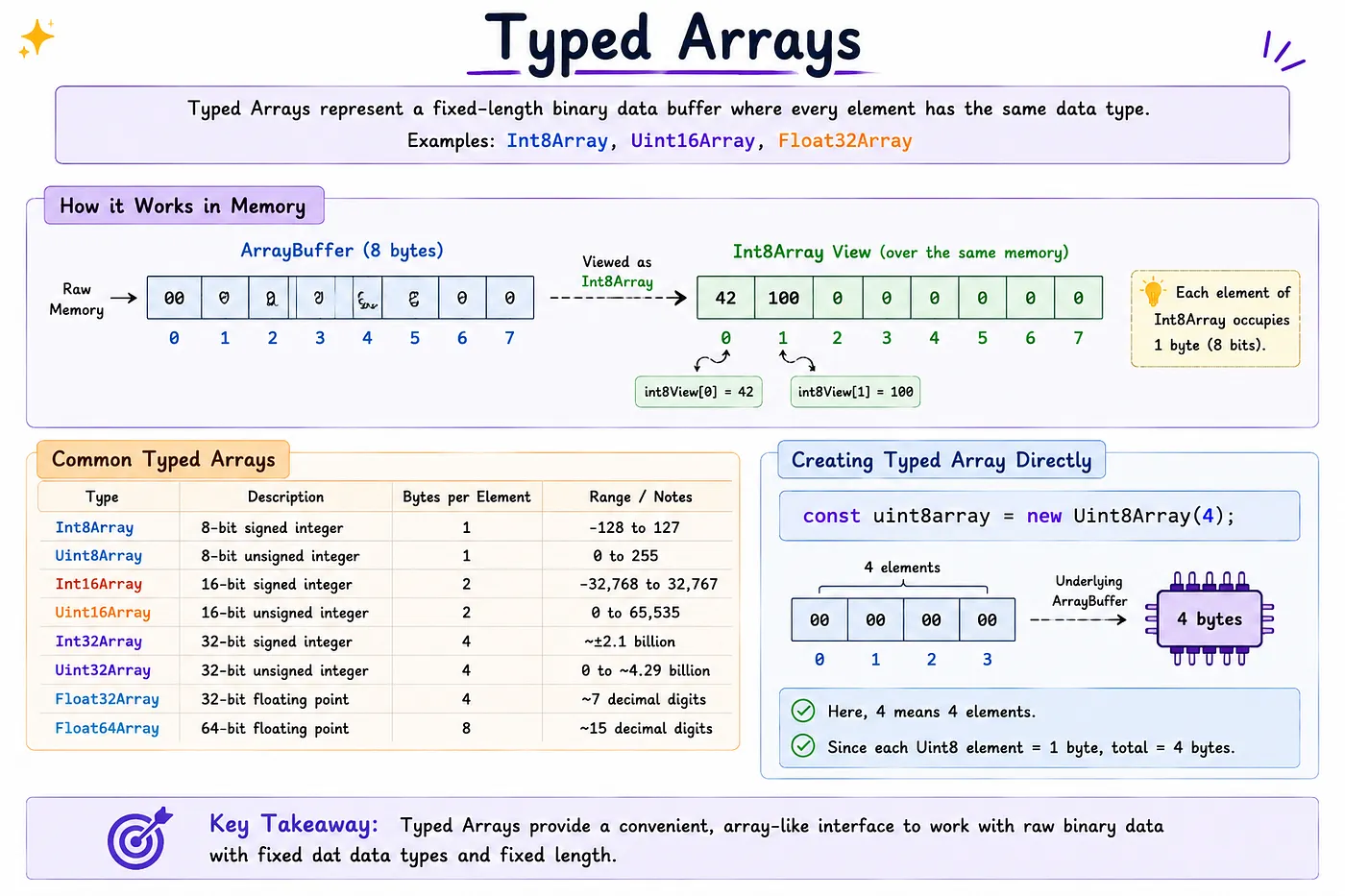
Here now, First, we created an ArrayBuffer of 8 bytes. Second, using Int8Array(), a Typed Array was created.
We can store and read numbers like a normal Array with an index. int8View[0] will point to the zeroth index of an array.
const buffer = new ArrayBuffer(8);
const int8View = new Int8Array(buffer);
int8View[0] = 42;
int8View[1] = 100;
console.log(int8View[0]);
console.log(int8View[1]);
Unlike DataView, a Typed Array lets us access its elements using normal array-style indexing:
int8View[0]
int8View[1]
We don’t always need to create an ArrayBuffer separately. A Typed Array can be created directly:
const uint8array = new Uint8Array(4);You can access that underlying ArrayBuffer through .buffer :
console.log(uint8array.buffer);Typed Array > .buffer > ArrayBuffer
The ArrayBuffer provides the memory; the Typed Array provides a typed way to view and access that memory.
Node.js Buffer
Now we have already learned ArrayBuffer, DataView, and Typed Array. So, Node.js Buffer becomes much easier.
The concepts above make it much easier to understand how Node.js Buffer works. In Node.js applications, Buffer is commonly used when working with binary data such as files, streams, sockets, and network protocols. Typed Array and DataView are still useful when their specific behavior is needed.
The question to ask is:
If JavaScript already has ArrayBuffer, why did Node.js create Buffer?
The Story
Node.js was built to handle:
- File systems
- HTTP servers
- TCP sockets
- Streams
- Images
- Videos
- PDFs
All of these work with binary data.
Node.js needed an efficient way to work with raw binary data for operations such as files and networking, so it introduced Buffer. JavaScript later standardized ArrayBuffer, Typed Arrays, and DataView for binary-data handling.
So Node.js created: Buffer
Years later, JavaScript introduced:
- ArrayBuffer
- TypedArray
- DataView
Today, Buffer is built on top of Uint8Array, but it still provides many Node.js specific utilities.
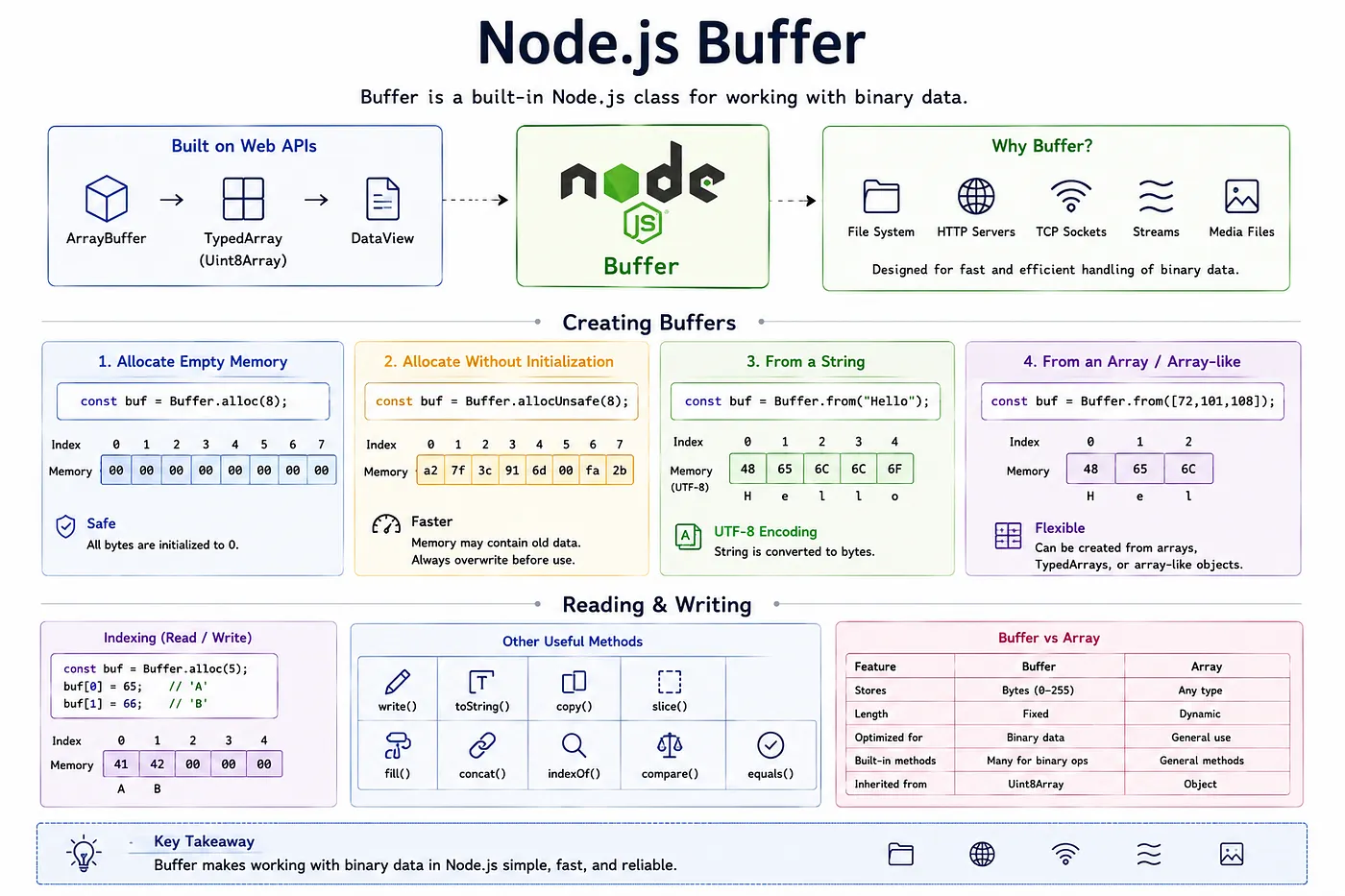
Now, moving towards creating Buffers:
Allocate empty memory
Explanation: Buffer.alloc() creates a new Buffer of the specified size and initializes all bytes to 0. Here, 8 bytes of Buffer is created. Also, we can import Buffer from buffer to get snippets in the IDE; otherwise, Buffer is globally available.
import { Buffer } from "buffer"
const myBuffer = Buffer.alloc(8);
myBuffer will give 8 bytes of empty space.
Use Case: Safe when initializing buffers which will contain sensitive data or require a fully cleaned memory space.
Allocate without initialization
Explanation: Buffer.allocUnsafe() allocates memory without initializing its contents. Therefore, the Buffer may contain arbitrary existing memory contents until you overwrite them. Similar to Buffer.alloc() but it doesn’t initialize the memory, which makes it marginally faster.
import { Buffer } from 'node:buffer';
const buffer = Buffer.allocUnsafe(10);
console.log(buffer);
// Prints (contents may vary): <Buffer a0 8b 28 3f 01 00 00 00 50 32>
buffer.fill(0);
console.log(buffer);
// Prints: <Buffer 00 00 00 00 00 00 00 00 00 00>
Faster, but the memory may contain old data until you overwrite it.
Use Case: When performance is imperative and the Buffer will be filled with data immediately after allocation.
From a string
Buffer can also be allocated with a direct string. It uses the from() function to do that.
const buffer = Buffer.from("Hello");Memory becomes approximately:
H   e   l   l   o
72 101 108 108 111
By default, Buffer.from encodes the string as UTF-8. Because the characters in “Hello” are part of ASCII, their UTF-8 byte values are the same as their ASCII values.
Reading & Writing
const buffer = Buffer.alloc(5);
buffer[0] = 65;
buffer[1] = 66;
console.log(buffer[0]); // 65
Memory: 65 66 0 0 0
A Buffer supports array-like indexed access because it is a subclass of Uint8Array. However, it also provides Node.js specific methods for working with binary data.
- write()
- toString()
- equals()
- copy()
- concat()
- slice(),fill()
- indexOf()
- compare() and some more like array.
To learn and see how it can be used, you can check out this.
How Buffer Actually Relates to Uint8Array? ArrayBuffer → Typed Array → Buffer
Bufferpool
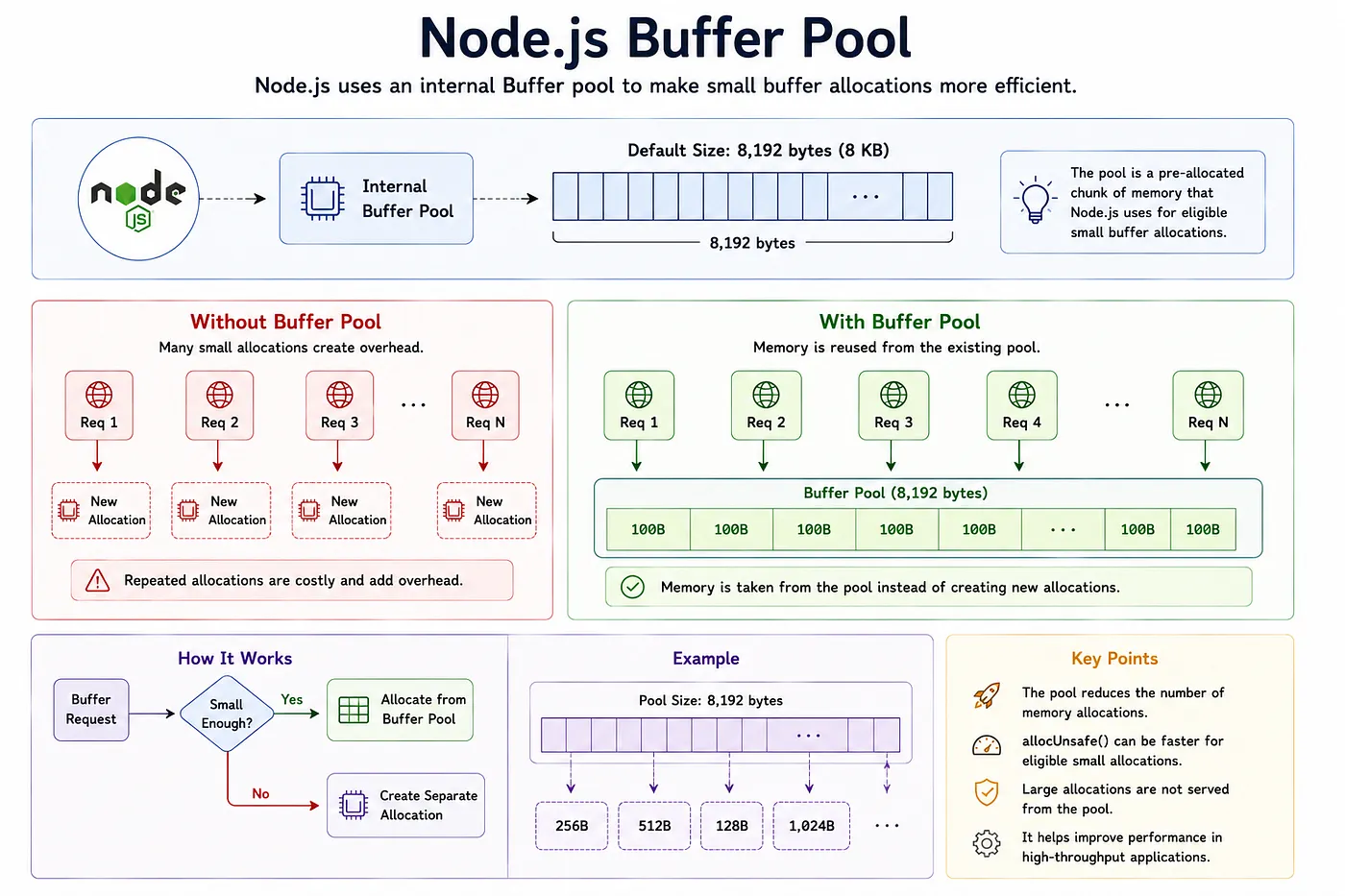
In Node.js, an internal buffer pool is a pre-allocated chunk of memory — defaulting to 8,192 bytes (8 KB) — used to manage and fulfill small buffer allocations efficiently.
Buffer.allocUnsafe() can use the internal Buffer pool for small allocations. In current Node.js behavior, the pool is used for allocations smaller than half of Buffer.poolSize; the default Buffer.poolSize is 8192 bytes, so the relevant threshold is 4096 bytes.
Also, don’t think that every allocUnsafe() function call uses the pool.
Imagine an HTTP Server
An HTTP server repeatedly creating many small Buffers. Constantly allocating and initializing small blocks of memory adds overhead. Node.js can reduce this overhead by maintaining a pool of memory for certain small Buffer allocations.
Each request needs a small Buffer:
Buffer.alloc(100);Without a Buffer Pool:
Request 1  → Allocate memory
Request 2  → Allocate memory
Request 3  → Allocate memory
...
Request 10000 → Allocate memory
Allocating memory thousands of times is expensive.
The Better Idea
Node.js says:
I’ll allocate one large chunk of memory once.
For example: 8192 bytes (8kb)
Now when you need a small Buffer:
Buffer.allocUnsafe(100);Node doesn’t ask the operating system for new memory. Instead, it takes 100 bytes from the existing pool.
Also, an important part is that allocunsafe() does not use the buffer pool every time. It’s certainly used when bytes are small.
Where You’ll See Buffers Throughout Node.js
Almost every core module uses them:
- fs → Reading and writing files
- http → Request and response bodies
- stream → Processing data in chunks
- net→ TCP communication
- crypto → Encryption and hashing
- zlib → Compression
Summary
My Friend, we started from low-level memory and binary data. With ArrayBuffer, we created a room-like block and made space for storing binary data in bytes.
DataView allows us to store and retrieve different types at specific byte offsets. Using ByteOffset and set and get methods. While TypedArray provides a typed array-like way to access binary data.
Node.js buffer builds on this foundation and provides a convenient way to interact with binary data. We also saw how BufferPool works in Nodejs.
ArrayBuffer
↓
Raw binary memory
↓
Typed Arrays / DataView
↓
Ways to interpret and manipulate that memory
↓
Node.js Buffer
↓
Practical binary-data operations
Once this mental model is clear, Buffer is no longer just another Node.js API. It becomes a practical tool for working with the bytes moving between your application, memory, files, and networks.
I hope you enjoyed and learned from the article.
a Nishant Dhanani Production